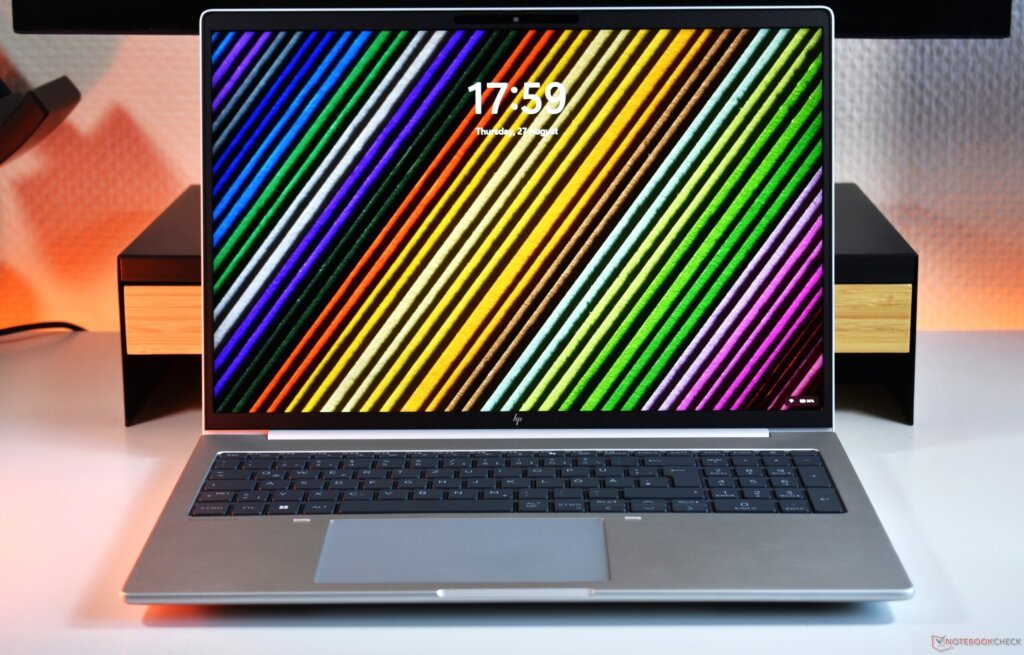
The HP EliteBook 8 G2a 16 is a business laptop designed for people who need a reliable computer for work, productivity and everyday professional tasks. It combines AMD Ryzen AI processors with a large 16-inch display, plenty of memory options, modern connectivity and business-focused security features.
Unlike gaming laptops that focus heavily on graphics performance, the EliteBook 8 G2a is built around productivity, reliability and long working sessions. It is available in several configurations, so the exact specifications can vary depending on the model you buy.
Here is what you need to know.
Design
The EliteBook 8 G2a 16 features a professional aluminium design with a clean and understated look. Its purpose is to allow itself to fit into a business environment with no flashy styling that is normally seen on gaming laptops.
The laptop is about 35.9 x 25cm thick and is between 1.15cm and 1.55cm thick in the front and rear respectively.
The 16-inch size gives you plenty of screen space for working with documents, spreadsheets and multiple applications.
HP’s attention to durability and security, too, is noteworthy for a business laptop.
Display
One of the interesting features of the EliteBook 8 G2a 16 is the variety of display modes you can use.
Basic setups feature a 16-inch WUXGA screen running at 1920 x 1200 resolution. Depending on the configuration, you can have a 300-nit panel with 62.5% sRGB coverage, or a brighter 400-nit panel with 100% sRGB coverage.
There is also a more advanced 2.5K display option with a 2560 x 1600 resolution and a 120Hz refresh rate. More suitable for users who value color accuracy, this panel delivers 100% coverage of Adobe RGB and DCI-P3.
Some configurations also offer an 800-nit Sure View privacy display.
It is very important to verify the exact screen specification before purchase. Depending on the configuration, two EliteBook 8 G2a 16 laptops can have different display experiences.
Performance
The Elitebook 8 G2a 16 features AMD’s Ryzen AI processors.
The Ryzen AI 7 450 is one of the premium choices, with eight cores, 16 threads and a boost clock frequency of 5.1GHz. It also comes with an AMD NPU that can deliver up to 50 TOPS of AI compute.
Built-in AMD Radeon graphics drives graphics. The Ryzen AI 7 450 processor features Radeon graphics with 860M.
This mix is appropriate for regular business use. The laptop can be used for Microsoft Office, Internet surfing, video conferencing, programming and large spreadsheets and multitasking.
It can also take on some lighter creative tasks, but it’s not meant to be a contender for laptops with dedicated gaming GPUs.
A recent independent review found the Ryzen-powered EliteBook delivered stable performance under sustained workloads without significant throttling.
RAM and Storage
The EliteBook 8 G2a 16 also comes in a variety of configurations for memory.
Depending on the model, HP offers up to 64GB of DDR5 RAM. Some configurations feature replaceable SODIMM memory while others have built-in memory and consumers must determine which configuration they want when making a purchase.
Storage capacities can be up to 1TB and higher, depending on the market and include PCIe NVMe SSDs.
If you use your computer for basic office tasks, documents and applications then you should be fine with 512GB of SSD storage, but if you’re always storing large files then you should consider getting 1TB of SSD storage.
If you’re using a heavy workload or running multiple applications that demand lots of RAM, you can also get more RAM for your professional needs.
Read Also: Dell Pro 5 16 P516265 Review: A Powerful Business Laptop Built for Modern Work
Keyboard and Touchpad
Comfort typing is a vital aspect of the keyboard of any business laptop, and HP has always focused on typing comfort with its EliteBook line.
The EliteBook 8 G2a 16 features a touchpad and a backlit keyboard, which are ideal for extended typing sessions.
However, there has been some criticism of the redesigned keyboard layout. A recent HP user feedback explicitly pointed out that certain navigation keys were awkwardly placed and this affected everyday typing.
If you are a frequent writer or coder, this is something you should bear in mind.
Ports and Connectivity
The Elitebook 8 g2a 16 comes with a decent lineup of ports.
Depending on the configuration, you can get two Thunderbolt 4 USB-C ports, another USB-C port, USB-A, HDMI 2.1 and a headphone/microphone combo jack. There are also some configurations that have an RJ-45 Ethernet port.
Wireless connectivity features Wi-Fi 7 and/or Bluetooth 6.0, with some models offering Wi-Fi 6E and/or Bluetooth 5.3.
Some configurations, such as 5G, also have optional cellular connectivity.
This makes the EliteBook perfect for those who connect external monitors, docks, wired networks and more.
Battery Life
It is one of the best features of the EliteBook 8 G2a 16 that it is rich in battery life.
In our testing, a Ryzen 7-equipped configuration lasted almost 19 hours in its Wi-Fi web-surfing test. The reviewer also observed the laptop to have no significant throttling or overheating during extended usage.
Actual battery life will vary depending on the processor, display, brightness and workload.
Nevertheless, the test result explains why the laptop is appealing for those who spend a lot of time out of the power wall socket.
Security
Security is a key aspect of EliteBook experience.
The laptop may come with options like HP Wolf Security, fingerprint reader, IR camera support for Windows Hello and privacy features, depending on the setup.
Some models also have the feature of HP Sure View, which can limit viewing angles and safeguard information during public viewing.
The features are especially beneficial for business and professionals who need to deal with confidential documents frequently.
HP EliteBook 8 G2a 16 Laptop Review: Should You Buy?
The HP EliteBook 8 G2a 16 laptop review reveals a device that is designed for business computing, not gimmicks and specs.
Particularly, it boasts some notable strengths such as its AMD Ryzen AI capabilities, extended battery life, ample connectivity choices, and robust security measures for business use.
The key thing to watch is the configuration. Different models can differ greatly in display quality, RAM type, processor and connectivity.
The keyboard layout may also take some getting used to, particularly if you frequently type for long periods.
Final Verdict
The HP EliteBook 8 G2a 16 laptop review focuses on a laptop that’s built to be a reliable laptop for work.
The Ryzen AI processors are capable of handling more of the productivity workloads demanded by users, while the built-in NPU supports newer forms of AI workloads. The 16-inch large screen is convenient for multitasking, while the 2.5K 120Hz display is available, which is more attractive to users who prefer a higher quality panel.