With the release of Wear OS 7, smartwatches like the Google Pixel Watch 4 and Samsung Galaxy Watch8 are getting exciting upgrades. These include new AI features, improved battery life, and the introduction of widgets. Google has now shared more details about these widgets, even showcasing examples for apps like Spotify.
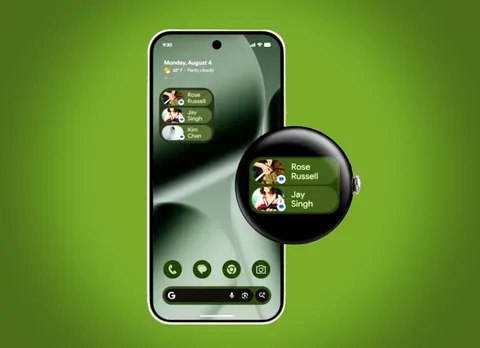
Widgets: The Star Feature of Wear OS 7
Announced just a week ago, Wear OS 7 promises about 10% lower power consumption and advanced AI capabilities (though many of these will only work on future smartwatch models). However, the standout feature is the new widget system. In a recently released video, Google explains how these widgets will work.
Widget Formats and Design
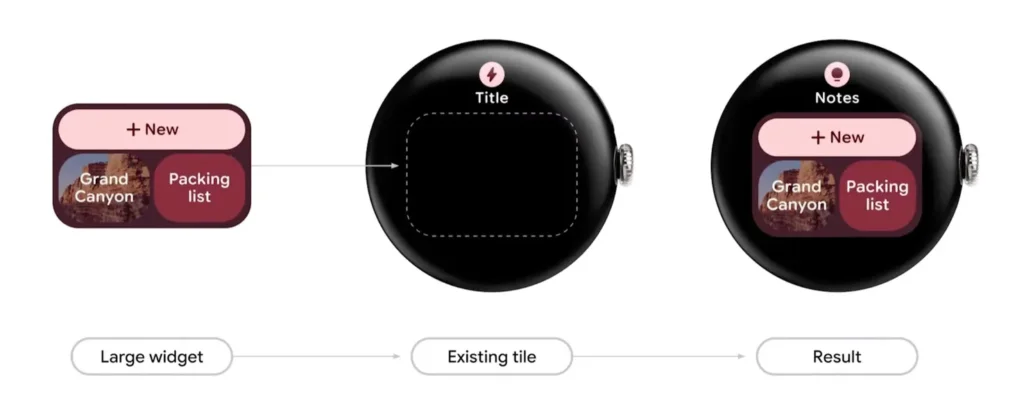
The widgets come in two sizes: 2×1 and 2×2. If you’re familiar with Android widgets, these will feel instantly recognizable. That’s intentional—Google wants widgets on Wear OS 7 to look and function just like their Android counterparts. This consistency ensures users can easily transition to smartwatches like the Google Pixel Watch 4 (priced at $309 on Amazon).
Benefits for Developers and Users
This unified design also benefits developers, making it easier and faster to create widgets. As a result, we can expect more widgets to become available compared to the older Tiles system. Additionally, the new widgets can replace full-screen Tiles and integrate seamlessly into devices like the Samsung Galaxy Watch8.
First Look at Third-Party Widgets
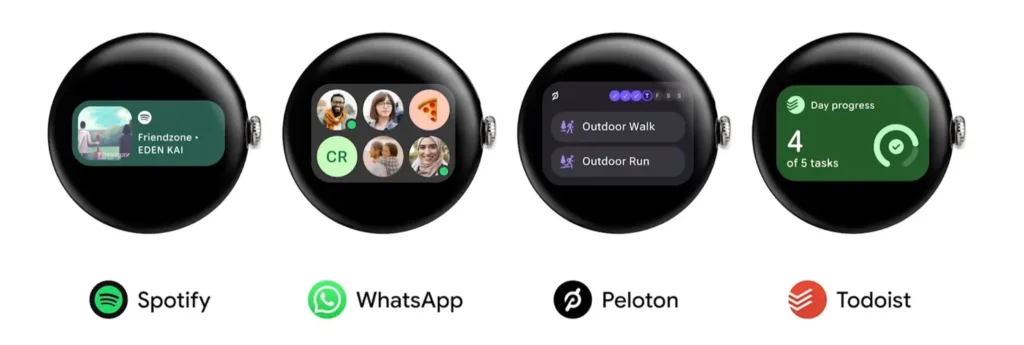
Google has already unveiled four widgets from third-party apps. For example:
- Spotify Widget: Displays the current song, complete with album art.
- WhatsApp Widget: Shows pictures of six selected contacts, allowing quick access to chats.
These widgets aren’t just visually different from Tiles—they’re also more efficient. They consume less power, contributing to the improved battery life promised by Wear OS 7.