Meta has quietly built the smallest, cheapest-feeling Trojan horse in smart-home history — and it is giving it away. The Muse Home Link is a tiny USB-C dongle that plugs into a wall socket, joins your home Wi-Fi, and lets Meta’s Muse AI agent talk directly to the gadgets already in your house: your TV, your speakers, your lights, even your printer. It costs nothing if you are an active Muse subscriber in the United States — but Meta only made 5,000 of them, and nobody outside Meta knows how many are left.
In this guide, we explain exactly what the Home Link is, how it works, its full specifications, how to get one, how to set it up, what it can and cannot control, and how it compares with building your own Muse gadget on an ESP32 board or a Raspberry Pi. We also look at why Meta is giving away hardware at all — and what that tells us about where the smart home is heading.
⚡ Muse Home Link at a glance
- What it is: a USB-C-powered Wi-Fi dongle that connects the Muse AI agent to smart-home devices on your local network.
- Announced: October 2, 2026, by Nat Friedman, Head of Product at Meta Superintelligence Labs.
- Chip: Espressif ESP32-C5 with Wi-Fi 6 (2.4 GHz and 5 GHz) and Bluetooth Low Energy setup.
- Size: just 35 × 42 × 10 mm — smaller than most USB flash drives.
- Price: free for active Muse subscribers in the US, one per account, while supplies last. Meta made 5,000.
- The catch: it runs official firmware only and cannot be reflashed. Builders who want to tinker should use the open-source Muse Gadgets SDK instead.
What is the Muse Home Link?
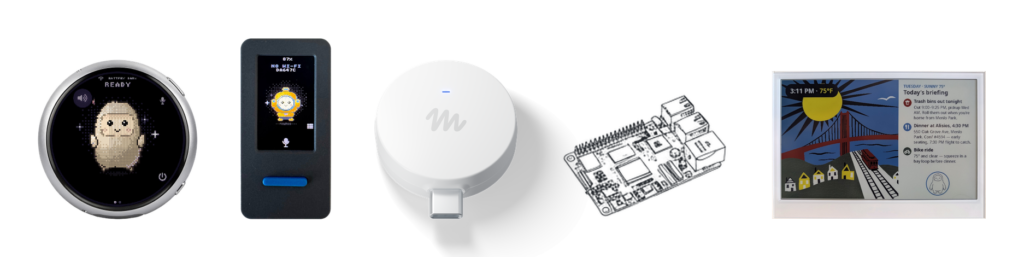
The Muse Home Link is the first piece of hardware Meta has built for its Muse AI agent that is designed to live in your home rather than on your person. Muse itself was introduced at Meta Connect 2026 as Meta’s personal AI agent, and the company also showed off the Muse Charm, a small keychain-style gadget. The Home Link is the other half of that idea: instead of carrying Muse with you, you plug it into your house.
Announcing it on October 2, 2026, Nat Friedman, Head of Product at Meta Superintelligence Labs, put it simply: “We built a gadget of our own, too: Muse Home Link is a little usb-c powered device that allows Muse to connect to your home network to talk to smart home devices like TVs and speakers and anything else that exposes https.” Meta’s Alexandr Wang amplified the announcement the same day. The news was covered in Engadget’s report on Muse Gadgets, which also confirmed the 5,000-unit giveaway.
That framing matters. The Home Link is not a smart speaker, it has no microphone, and it is not a hub in the traditional sense. It is a bridge: a small, always-on network device that gives Muse a presence inside your home network, so the AI can reach the devices that already live there.
How does the Muse Home Link work?
Most smart-home assistants work by talking to a cloud service, which then talks to your devices. The Home Link takes a more direct route. It joins your home Wi-Fi network, and from there Muse can communicate with smart-home devices that expose an HTTPS endpoint or a local HTTP API. In plain English: if a device on your network can be controlled over the web or over your local network, Muse can now reach it through the Home Link.
That is why the list of compatible devices is so broad. Meta’s own examples include turning on lights, controlling a TV and sending a document to a printer — three very different jobs that share one thing in common: the target device is reachable on the local network. Community skills and integrations listed for the platform include Philips Hue, Sonos, Apple TV, Google Nest speakers and Samsung TVs.
The skills system is what makes the dongle useful rather than merely clever. Muse Gadgets are extended by “skills” — software integrations that teach Muse how to talk to a particular device or service. You add the skills you need in the Muse app, and the Home Link becomes the route Muse uses to reach them inside your home.
Muse Home Link specs: the full hardware breakdown
For a device the size of a matchbox, the Home Link is surprisingly well specified. The figures below come from the official Muse Home Link page and from multiple outlets that covered the launch.
| Specification | Muse Home Link |
|---|---|
| Chip | Espressif ESP32-C5 (32-bit RISC-V processor at 240 MHz) |
| Wi-Fi | Wi-Fi 6, 2.4 GHz and 5 GHz |
| Setup radio | Bluetooth Low Energy (BLE) for pairing |
| Memory | 8 MB PSRAM |
| Storage | 8 MB flash |
| Power | USB-C (USB-A adapter included in the box) |
| Indicator | LED for pairing and device status |
| Dimensions | 35 × 42 × 10 mm |
| Firmware | Official firmware only — cannot be reflashed |
| Availability | 5,000 units made; free for active US Muse subscribers, one per account, while supplies last |
The choice of the ESP32-C5 is telling. It is the same family of chip that hobbyists use in DIY smart-home projects, which is exactly the point: Meta built its own gadget on the same open hardware foundation it is offering to developers. Wi-Fi 6 on both 2.4 GHz and 5 GHz means the dongle can sit on the less congested 5 GHz band while still reaching 2.4 GHz-only smart-home gear through your router, and BLE keeps the first-time pairing process simple.
How to get a Muse Home Link
Meta manufactured a batch of 5,000 Home Links and offered them free to active Muse subscribers in the United States, one per account, on a first-come, first-served basis while supplies last. Friedman said at launch that they should be ready to ship within a few weeks of October 2, 2026.
⚠️ Availability check — November 22, 2026
We checked the live official Muse Gadgets site on November 22, 2026. It still lists the Home Link as “included with an active Muse subscription in the United States only, limit one per subscriber” and still links to an order page — there is no sold-out notice on the page. But Meta has not published a live stock count, so we cannot confirm how many of the 5,000 remain, or that the free offer is still open. Do not assume it is still available: if you are an eligible US subscriber and you want one, check the official page now.
If the offer is still open, these are the steps:
- Be an active Muse subscriber in the United States. The free offer is limited to active subscribers, and to US accounts only.
- Go to the official Muse Gadgets site and open the Home Link page, where the order button lives.
- Order through Muse’s site. The order flow runs from the official page — you will need to be signed in to your Muse account.
- Claim one per account. The limit is strictly one Home Link per subscriber, so there is no way to order spares for other rooms.
- Wait for shipping. At launch, Meta said the first batch should be ready to ship within a few weeks of October 2, 2026.
There is no retail price for the Home Link, and Meta has not said it will sell the dongle in stores. If you miss the free batch, the official route to the same idea is to build your own gadget with the open-source SDK — more on that below.
How to set up the Muse Home Link
Setup is deliberately short, and Meta describes it in three moves: plug it in, pair it with Muse, then ask Muse. Here is the full flow, as described on the official Home Link page:
- Plug it in. Connect the Home Link to power with the USB-C cable (a USB-A adapter is in the box). The LED shows the device is powered and ready to pair.
- Pair it with Muse. In the Muse app, pair the dongle over Bluetooth Low Energy and choose your home Wi-Fi network. The LED indicates pairing and device status while this happens.
- Ask Muse. Once the dongle is on your Wi-Fi, talk to Muse as normal — from the app or wherever you use it — and ask it to do things with your home devices.
- Add skills. In the Muse app, add skills for the devices you own — for example the Philips Hue or Sonos skills — so Muse knows how to control them through the Home Link.
That is the whole setup. There is no separate hub app to install, no account to create for the dongle itself, and no wiring: the Home Link’s only connection to your home is power and Wi-Fi.
What can the Muse Home Link control?
Anything on your home network that exposes an HTTPS endpoint or a local HTTP API is, in principle, reachable. In practice, that is what the skills system is for — each skill teaches Muse how to speak to one kind of device. The community skills and integrations listed for the platform so far include:
- Philips Hue — lights, scenes and rooms.
- Sonos — wireless speakers and multi-room audio.
- Apple TV — controlling your TV through Muse.
- Google Nest speakers — smart speakers on your network.
- Samsung TVs — Samsung television control.
Meta’s own example uses show the range: turning on the lights when you get home, controlling a TV without hunting for the remote, and sending a document to a printer. The common thread is that these are jobs where a conversational AI is genuinely more convenient than an app — you describe the outcome, and Muse works out which device to talk to and how.
Because the SDK is open source, the list of skills is expected to grow as developers build integrations for their own devices. That is the bet behind the whole project: Meta supplies the bridge and the software plumbing, and the community supplies the long tail of devices.
Muse Home Link vs DIY ESP32 build vs Raspberry Pi / Linux gadget
The Home Link is only one of three ways to put Muse on hardware. The other two are do-it-yourself routes using the open-source Muse Gadgets SDKs, which Meta released under the Apache 2.0 licence. Developers get an SDK token from the official Muse Gadgets site and pair their device in the Muse app under Settings → Devices, after enabling Developer mode. DIY devices show up in the app with a “MuseGadget” prefix.
Here is how the three options compare:
| Muse Home Link (official) | DIY ESP32 build | Raspberry Pi / Linux gadget | |
|---|---|---|---|
| Who makes it | Meta | You, on your own ESP32 board | You, on a Raspberry Pi or Linux box |
| SDK | Official firmware (closed) | ESP32 Device SDK (open source, Apache 2.0) | Linux Device SDK (open source, Apache 2.0) |
| Cost | Free for eligible US subscribers (5,000 units) | Cost of your own ESP32 board and parts | Cost of your own Pi or Linux hardware |
| Can you reflash it? | No — official firmware only | Yes — it is your board and your code | Yes — full Linux control |
| Form factor | Tiny dongle, 35 × 42 × 10 mm | Anything you build — Meta suggests an E Ink display, an HDMI dongle for a TV, or a small touchscreen like the Muse Charm | Anything you build — most powerful and flexible option |
| Setup | Plug in, pair over BLE, done | Flash the SDK, get a token, pair in the Muse app (Developer mode) | Install the SDK, get a token, pair in the Muse app (Developer mode) |
| Best for | Anyone who wants Muse in their home with zero tinkering | Makers who want a custom, low-power gadget | Makers who want the most capable DIY device |
The code for both SDKs is published on GitHub at facebookincubator/muse-gadget-sdk, with separate esp32, linux and skills directories. In short: the Home Link is the easy, finished product, while the SDKs are the open invitation to build whatever comes next.
🔧 Tap to expand: how the DIY pairing works
Developers start at the official Muse Gadgets site, where they get an SDK token. They flash or install the SDK on their own hardware, then open the Muse app, enable Developer mode, and pair the device under Settings → Devices. Once paired, the DIY gadget appears in the app with a “MuseGadget” prefix, and the developer can add skills to it — for example, a skill that talks to a specific brand of lights or a printer on the same network. Meta’s suggested DIY forms include an E Ink display that shows Muse’s answers, an HDMI dongle that turns a TV into a Muse display, and a small touchscreen accessory similar to the Muse Charm.
What the Muse Home Link can’t do — the limitations
A free dongle the size of a matchbox is not going to replace your whole smart home, and it is worth being clear about its limits before you try to claim one.
🚫 Tap to expand: the full list of limitations
- It cannot be reflashed. The retail Home Link runs official firmware only. If you want to modify the software, you need a DIY build, not the free dongle.
- Only 5,000 exist, and only for the US. The giveaway is limited to active Muse subscribers in the United States, one per account, while supplies last — and we could not confirm on November 22, 2026 how many remain.
- It has no microphone or speaker. It is a network bridge, not a smart speaker. You talk to Muse through the app, not through the dongle.
- It only reaches devices that expose HTTPS or a local HTTP API. A gadget with no network interface at all cannot be controlled through the Home Link.
- You need an active Muse subscription. The dongle is included with an active subscription — it is not a standalone product you can buy and use on its own.
- One per account. There is no way to get a second dongle for another property or a second home.
None of those limits is a surprise — they are the trade-offs of a tiny, free, single-purpose bridge. But they do mean the Home Link is a starting point for Muse in the home, not the finished smart-home system.
Why is Meta doing this? Open hardware vs the closed smart home
To understand the Home Link, it helps to know where Muse sits. Muse is Meta’s personal AI agent, launched on September 8, 2026, with tiers running from a free tier to a $100-a-month power plan, according to Forkast. Meta showed the Muse Charm keychain at Meta Connect on September 23, 2026, and the Home Link followed barely a week later, on October 2.
The strategy is the opposite of the one Apple and Google have taken with their smart homes. Their approach has been to sell you the hub, the speaker and the ecosystem, and to keep the whole stack under their control. Meta is doing something stranger: it is open-sourcing the hardware layer. The Muse Gadgets SDKs are Apache 2.0 open source, the code is on GitHub, and the company is encouraging developers — and hobbyists — to put Muse on whatever hardware they like, from an ESP32 board to a Raspberry Pi.
The Home Link is the proof that the idea works, and the giveaway is the distribution strategy. Five thousand free dongles will not make Meta any money. But 5,000 homes where Muse can turn on the lights, run the TV and print a document are 5,000 demonstrations of an AI agent that is genuinely useful in the physical world — and every DIY gadget built on the SDK extends that reach further, on hardware Meta never has to manufacture.
It is also a bet on where the value in the smart home will sit. If the agent is the product, the hardware underneath it can be cheap, open and interchangeable. Meta is happy to let the hardware be a commodity, because it wants to own the intelligence that runs on top of it.
What the Muse Home Link means for the smart home
The Home Link is the first dedicated smart-home device from a major AI agent maker, and that first matters. Until now, AI agents have lived in apps and browsers; the smart home has belonged to speakers and hubs. The Home Link is the first product that treats those as one problem: an agent that can act in your home, not just answer questions about it.
If Meta’s open approach catches on, the next few years could look very different from the last decade of smart-home history. Instead of choosing between one company’s hub and another’s, you might choose an agent — Muse, or a rival — and run it on whatever cheap, open hardware you prefer. The skills system points in that direction too: an open list of integrations that grows because developers add to it, not because a single company negotiates each partnership.
None of that is guaranteed. Five thousand dongles is a tiny number next to the installed base of Echo and Nest devices, and the free offer may already be exhausted — we could not confirm otherwise on November 22, 2026. But the direction of travel is clear: Meta has decided that the smart home should be open, and it has put a free piece of hardware in 5,000 homes to prove it.
Frequently asked questions
Is the Muse Home Link really free?
Yes — Meta manufactured 5,000 Home Links and offered them free to active Muse subscribers in the US, one per account, first come first served while supplies last. But we could not confirm on November 22, 2026 whether any of the 5,000 are still available, so check the official Muse Gadgets site before assuming the offer is still open.
Do I need a Muse subscription to use it?
Yes. The Home Link is included with an active Muse subscription in the United States only, and it is designed to work with the Muse AI agent. Muse itself launched on September 8, 2026, with tiers from a free tier to a $100-a-month power plan, according to Forkast.
Can I reflash or hack the Home Link?
No. The retail Home Link runs official firmware only and cannot be reflashed. If you want to tinker, build your own gadget instead, using the open-source ESP32 or Linux Device SDKs from the Muse Gadget SDK on GitHub.
What devices can it control?
Any smart-home device that exposes HTTPS or a local HTTP API, once the matching skill is added. Community skills listed for the platform include Philips Hue, Sonos, Apple TV, Google Nest speakers and Samsung TVs, and Meta’s examples include turning on lights, controlling a TV and sending a document to a printer.
How big is the Muse Home Link?
Just 35 × 42 × 10 mm. It is powered over USB-C, connects over Wi-Fi 6 (2.4 GHz and 5 GHz), pairs over Bluetooth Low Energy, and has an LED for pairing and status.
Is it available outside the US?
Not through this offer. The free Home Link giveaway is limited to active Muse subscribers in the United States, one per account. The DIY route is different: anyone can use the open-source SDKs on their own hardware.
Watch: Tech Mansion on the AI race
Meta is not the only company betting that AI is about to move from the screen into the rest of your life. In the video below, Tech Mansion looks at how Apple is quietly positioning itself in the same race — useful context for why Meta is giving away hardware to get Muse into your home.
Sources: Engadget’s Muse Gadgets report, the official Muse Gadgets site, and Nat Friedman’s October 2 announcement. Availability checked November 22, 2026.