The right technology can be the difference between getting ready to go to school in the new school year or creating an efficient workspace at work. The work and learning demands today are more than ever before in 2026. Video calls are everywhere, cloud applications are omnipresent, and multitasking demands more than ever before of your devices. Learning how to build the ideal technology system could save you time, save frustration and even enhance your creativity.
However, this is not only about the most expensive devices but it is also about making smart, sensible decisions that will suit your workspace, lifestyle and ambitions.
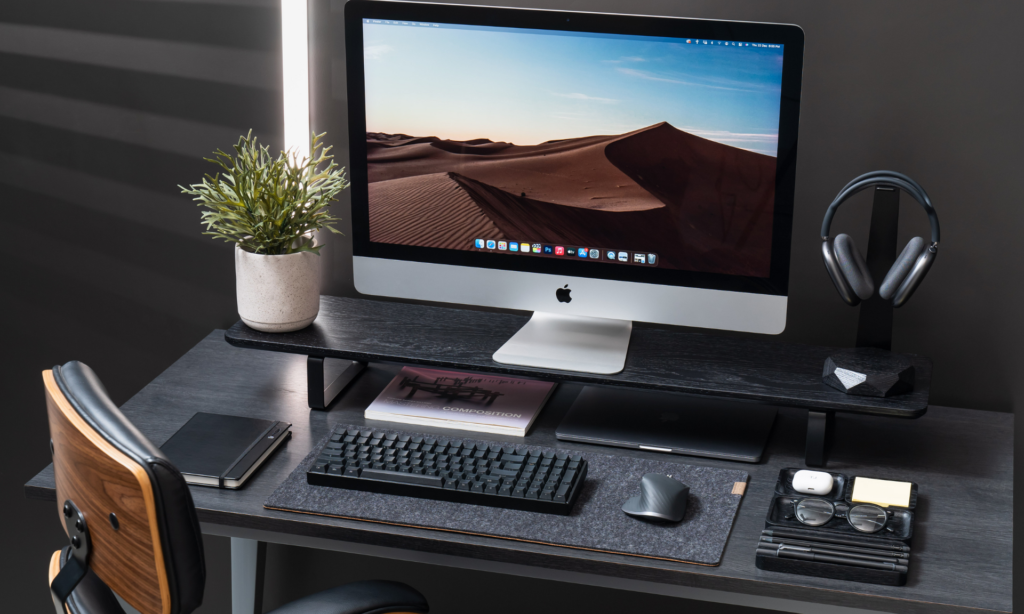
Start With the Right Computer.
Your core tech device is your primary device, be it a laptop or desktop. The performance, portability and compatibility with cloud services are more important than ever in 2026. A laptop that has 16GB or more RAM and a solid-state disk will work well with students who have to multitask on research, editing documents and video calls. Investing in a machine with a powerful processor and graphics capability will save a lot of time and frustration to the professionals, particularly one dealing with creative applications.
It is easy to be taken up by the specs alone but keep in mind that your workflow determines what you need. Take into account the programs that you use the most, file sizes you are working with, and portability requirements. In doing so, you should be laying the very first stone in your path to create the perfect tech setup.
Read More: How to Speed Up Your Old Laptop Before 2026: A Complete Guide to Bringing It Back to Life
Select Monitors to Your Workflow.
When you spend hours staring at a monitor, spending money on the correct monitor will make a significant difference in comfort and productivity. However, in 2026, dual monitors or super-wide screens will be more affordable and will be capable of significantly improving productivity. You can have your research on one screen and you can get your notes or make your coding on the other. A single large monitor can be enough to students, but such a monitors will be helpful to the professionals who have to work with data, editing, or an ability to design.
Important factors are resolution, refresh rate, and color accuracy. Long working or studying hours can be much more comfortable even with such minor details as adjustable stands to ease the strain on the neck. Choosing the monitors that can work well with your needs is an important process when you are planning to create the perfect tech setup.
Invest in Ergonomic Accessories.
Any computer can spoil your day, however mighty it may be. Even physical strain can be prevented with the help of a comfortable chair with adjustable desk, external keyboard and mouse made to be used long enough to avoid fatigue. The ergonomic key board helps minimize chances of pains in the wrists and a good chair helps in maintaining your posture when attending long lectures or meetings.
Accessories in 2026 are also smarter. Keyboards can now have programmable keys as shortcuts and mice can offer custom sensitivity and side keys to use multiple functions. All these minor improvements can be subtle, but they make a workflow more composed and easy to use, transforming an otherwise decent tech environment into a flawless one.
Ensure Reliable Connectivity
Your devices are only as good as your internet connection. Laggy video calls or slow downloads can turn a productive day into a frustrating one. High-speed Wi-Fi with mesh systems for larger spaces or Ethernet connections for desktops ensure stability.
Additionally, cloud integration is essential in 2026. Services like Google Workspace, OneDrive, and iCloud allow seamless file access across devices. By planning your network and storage needs, you make your setup not just functional, but future-ready.
Audio and Video Matter
With remote learning and online meetings continuing to dominate, investing in quality audio and video is more important than ever. Built-in laptop microphones and cameras may be sufficient for casual use, but dedicated webcams and microphones create a professional, distraction-free experience.
Noise-cancelling headphones are another powerful tool. They help you focus in busy environments and improve the quality of your calls. These enhancements are often overlooked, but they are crucial when aiming to create the perfect tech setup that supports both efficiency and comfort.
Organize Your Workspace
An untidy desk is not only aesthetically displeasing but also distracting and counterproductive. Cable management systems, docking stations, and device stands make it easy to have order and keep your gadgets at the same time on hand. A good number of setups in the year 2026 will be equipped with smart charging pads to charge the various devices, wireless keyboards, and vertical setups of laptops and tablets.
An organized and clean workspace makes your technical feel considered and purposeful. It enables you to transition between activities, be it between a lecture, a coding session or even a client call.
Power Backup Solutions and Backup Solutions.
Nobody enjoys wasting time at work because of unplanned power cuts or failure of devices. UPS (uninterruptible power supplies), additional chargers, and battery banks make sure your configuration does not shut down. Cloud backup and external drives are also a good backup system since they ensure that your files are protected against accidental loss or hardware failure.
By 2026, data protection will be integrated into a technical configuration just like a monitor or keyboards do. The added solutions will guarantee that you have a continuous and stress-free workflow.
Personalize and Adapt
You should serve technology and not vice versa. The most optimal configurations in 2026 can be customized to your specifications. The height of the monitors, lighting can be customized, shortcuts can be programmed, even a smart assistant can be added in order to make your workspace feel intuitive and responsive.
Personalization is not just a matter of beauty, but it is rather creating a mobile environment in which you can concentrate, study, and work effectively. By doing the time to synchronize your devices, accessories and surroundings with what you are doing every day you really make the best tech setup.
Final Thoughts
Creating an effective workspace for 2026 isn’t just about buying the latest gadgets—it’s about thoughtful choices, comfort, and future-proofing. By combining a powerful main device, ergonomic accessories, reliable connectivity, quality audio and video, organized space, and strong backup solutions, you set yourself up for both productivity and comfort.
Whether you’re a student tackling online classes or a professional navigating a hybrid work environment, these steps help you not only work smarter but also feel more in control. Investing the time and effort to create the perfect tech setup today ensures that your devices, space, and workflow support your goals now and in the years to come.